Day 4

Daily Visualisations and Analysis
Author

Khushi

Introduction

Today, we are looking at quantities.

library(tidyverse)
── Attaching core tidyverse packages ──────────────────────── tidyverse 2.0.0 ──
✔ dplyr     1.1.4     ✔ readr     2.1.5
✔ forcats   1.0.0     ✔ stringr   1.5.1
✔ ggplot2   3.5.1     ✔ tibble    3.2.1
✔ lubridate 1.9.3     ✔ tidyr     1.3.1
✔ purrr     1.0.2     
── Conflicts ────────────────────────────────────────── tidyverse_conflicts() ──
✖ dplyr::filter() masks stats::filter()
✖ dplyr::lag()    masks stats::lag()
ℹ Use the conflicted package (<http://conflicted.r-lib.org/>) to force all conflicts to become errors
library(mosaic)
Registered S3 method overwritten by 'mosaic':
  method                           from   
  fortify.SpatialPolygonsDataFrame ggplot2

The 'mosaic' package masks several functions from core packages in order to add 
additional features.  The original behavior of these functions should not be affected by this.

Attaching package: 'mosaic'

The following object is masked from 'package:Matrix':

    mean

The following objects are masked from 'package:dplyr':

    count, do, tally

The following object is masked from 'package:purrr':

    cross

The following object is masked from 'package:ggplot2':

    stat

The following objects are masked from 'package:stats':

    binom.test, cor, cor.test, cov, fivenum, IQR, median, prop.test,
    quantile, sd, t.test, var

The following objects are masked from 'package:base':

    max, mean, min, prod, range, sample, sum
library(ggformula)
library(skimr)

Attaching package: 'skimr'

The following object is masked from 'package:mosaic':

    n_missing
library(crosstable) 

Attaching package: 'crosstable'

The following object is masked from 'package:purrr':

    compact
Look at the diamonds dataset

diamonds
# A tibble: 53,940 × 10
   carat cut       color clarity depth table price     x     y     z
   <dbl> <ord>     <ord> <ord>   <dbl> <dbl> <int> <dbl> <dbl> <dbl>
 1  0.23 Ideal     E     SI2      61.5    55   326  3.95  3.98  2.43
 2  0.21 Premium   E     SI1      59.8    61   326  3.89  3.84  2.31
 3  0.23 Good      E     VS1      56.9    65   327  4.05  4.07  2.31
 4  0.29 Premium   I     VS2      62.4    58   334  4.2   4.23  2.63
 5  0.31 Good      J     SI2      63.3    58   335  4.34  4.35  2.75
 6  0.24 Very Good J     VVS2     62.8    57   336  3.94  3.96  2.48
 7  0.24 Very Good I     VVS1     62.3    57   336  3.95  3.98  2.47
 8  0.26 Very Good H     SI1      61.9    55   337  4.07  4.11  2.53
 9  0.22 Fair      E     VS2      65.1    61   337  3.87  3.78  2.49
10  0.23 Very Good H     VS1      59.4    61   338  4     4.05  2.39
# ℹ 53,930 more rows

First 10 rows of the diamonds dataset

diamonds
# A tibble: 53,940 × 10
   carat cut       color clarity depth table price     x     y     z
   <dbl> <ord>     <ord> <ord>   <dbl> <dbl> <int> <dbl> <dbl> <dbl>
 1  0.23 Ideal     E     SI2      61.5    55   326  3.95  3.98  2.43
 2  0.21 Premium   E     SI1      59.8    61   326  3.89  3.84  2.31
 3  0.23 Good      E     VS1      56.9    65   327  4.05  4.07  2.31
 4  0.29 Premium   I     VS2      62.4    58   334  4.2   4.23  2.63
 5  0.31 Good      J     SI2      63.3    58   335  4.34  4.35  2.75
 6  0.24 Very Good J     VVS2     62.8    57   336  3.94  3.96  2.48
 7  0.24 Very Good I     VVS1     62.3    57   336  3.95  3.98  2.47
 8  0.26 Very Good H     SI1      61.9    55   337  4.07  4.11  2.53
 9  0.22 Fair      E     VS2      65.1    61   337  3.87  3.78  2.49
10  0.23 Very Good H     VS1      59.4    61   338  4     4.05  2.39
# ℹ 53,930 more rows
 head(10)
[1] 10

Glimpse - diamonds dataset

glimpse(diamonds)
Rows: 53,940
Columns: 10
$ carat   <dbl> 0.23, 0.21, 0.23, 0.29, 0.31, 0.24, 0.24, 0.26, 0.22, 0.23, 0.…
$ cut     <ord> Ideal, Premium, Good, Premium, Good, Very Good, Very Good, Ver…
$ color   <ord> E, E, E, I, J, J, I, H, E, H, J, J, F, J, E, E, I, J, J, J, I,…
$ clarity <ord> SI2, SI1, VS1, VS2, SI2, VVS2, VVS1, SI1, VS2, VS1, SI1, VS1, …
$ depth   <dbl> 61.5, 59.8, 56.9, 62.4, 63.3, 62.8, 62.3, 61.9, 65.1, 59.4, 64…
$ table   <dbl> 55, 61, 65, 58, 58, 57, 57, 55, 61, 61, 55, 56, 61, 54, 62, 58…
$ price   <int> 326, 326, 327, 334, 335, 336, 336, 337, 337, 338, 339, 340, 34…
$ x       <dbl> 3.95, 3.89, 4.05, 4.20, 4.34, 3.94, 3.95, 4.07, 3.87, 4.00, 4.…
$ y       <dbl> 3.98, 3.84, 4.07, 4.23, 4.35, 3.96, 3.98, 4.11, 3.78, 4.05, 4.…
$ z       <dbl> 2.43, 2.31, 2.31, 2.63, 2.75, 2.48, 2.47, 2.53, 2.49, 2.39, 2.…

Inspect - diamonds dataset

inspect(diamonds)

categorical variables:  
     name   class levels     n missing
1     cut ordered      5 53940       0
2   color ordered      7 53940       0
3 clarity ordered      8 53940       0
                                   distribution
1 Ideal (40%), Premium (25.6%) ...             
2 G (20.9%), E (18.2%), F (17.7%) ...          
3 SI1 (24.2%), VS2 (22.7%), SI2 (17%) ...      

quantitative variables:  
   name   class   min     Q1  median      Q3      max         mean           sd
1 carat numeric   0.2   0.40    0.70    1.04     5.01    0.7979397    0.4740112
2 depth numeric  43.0  61.00   61.80   62.50    79.00   61.7494049    1.4326213
3 table numeric  43.0  56.00   57.00   59.00    95.00   57.4571839    2.2344906
4 price integer 326.0 950.00 2401.00 5324.25 18823.00 3932.7997219 3989.4397381
5     x numeric   0.0   4.71    5.70    6.54    10.74    5.7311572    1.1217607
6     y numeric   0.0   4.72    5.71    6.54    58.90    5.7345260    1.1421347
7     z numeric   0.0   2.91    3.53    4.04    31.80    3.5387338    0.7056988
      n missing
1 53940       0
2 53940       0
3 53940       0
4 53940       0
5 53940       0
6 53940       0
7 53940       0

Skim - diamonds dataset

skim(diamonds)
Data summary
Name diamonds
Number of rows 53940
Number of columns 10
_______________________
Column type frequency:
factor 3
numeric 7
________________________
Group variables None

Variable type: factor

skim_variable n_missing complete_rate ordered n_unique top_counts
cut 0 1 TRUE 5 Ide: 21551, Pre: 13791, Ver: 12082, Goo: 4906
color 0 1 TRUE 7 G: 11292, E: 9797, F: 9542, H: 8304
clarity 0 1 TRUE 8 SI1: 13065, VS2: 12258, SI2: 9194, VS1: 8171

Variable type: numeric

skim_variable n_missing complete_rate mean sd p0 p25 p50 p75 p100 hist
carat 0 1 0.80 0.47 0.2 0.40 0.70 1.04 5.01 ▇▂▁▁▁
depth 0 1 61.75 1.43 43.0 61.00 61.80 62.50 79.00 ▁▁▇▁▁
table 0 1 57.46 2.23 43.0 56.00 57.00 59.00 95.00 ▁▇▁▁▁
price 0 1 3932.80 3989.44 326.0 950.00 2401.00 5324.25 18823.00 ▇▂▁▁▁
x 0 1 5.73 1.12 0.0 4.71 5.70 6.54 10.74 ▁▁▇▃▁
y 0 1 5.73 1.14 0.0 4.72 5.71 6.54 58.90 ▇▁▁▁▁
z 0 1 3.54 0.71 0.0 2.91 3.53 4.04 31.80 ▇▁▁▁▁

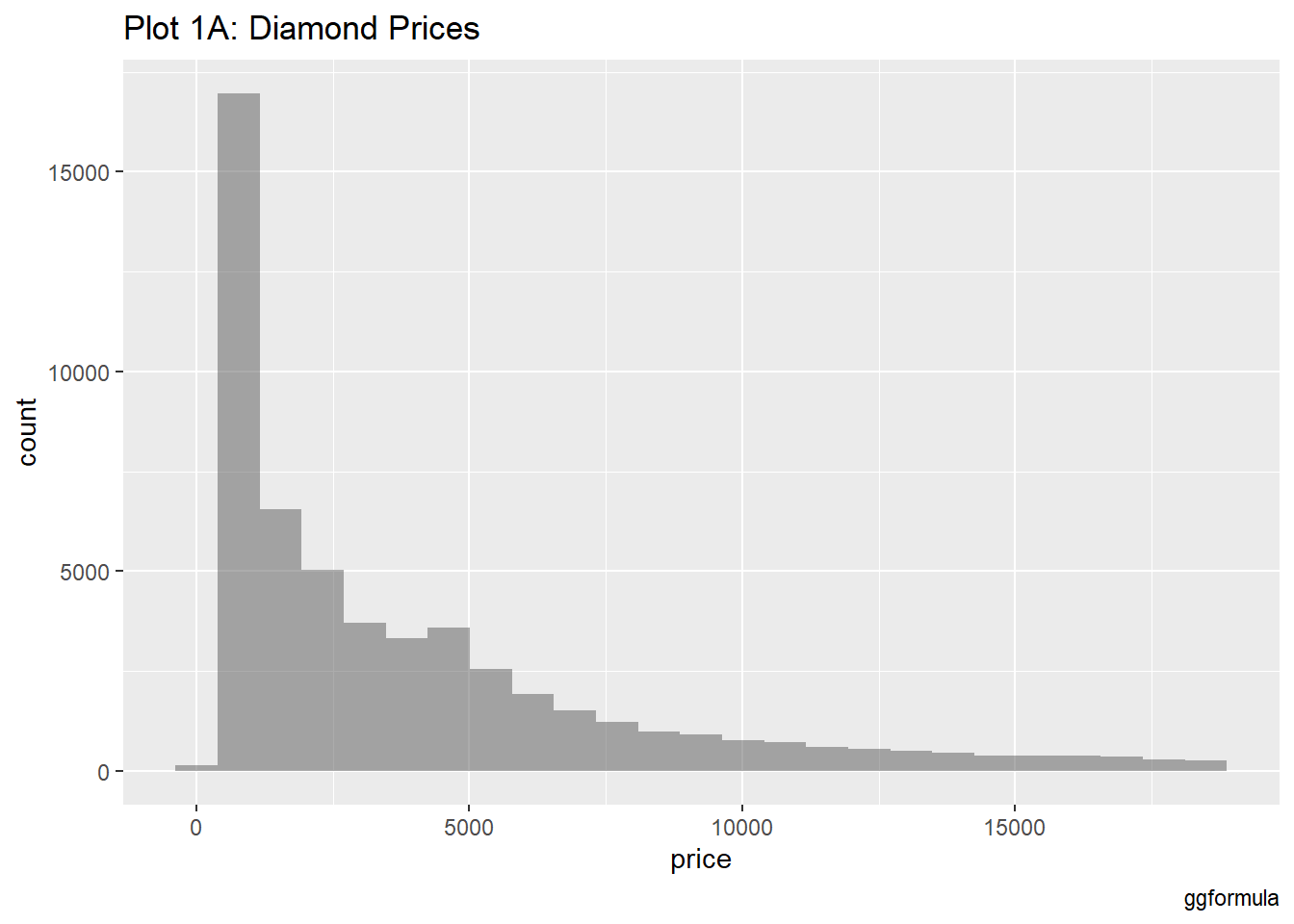
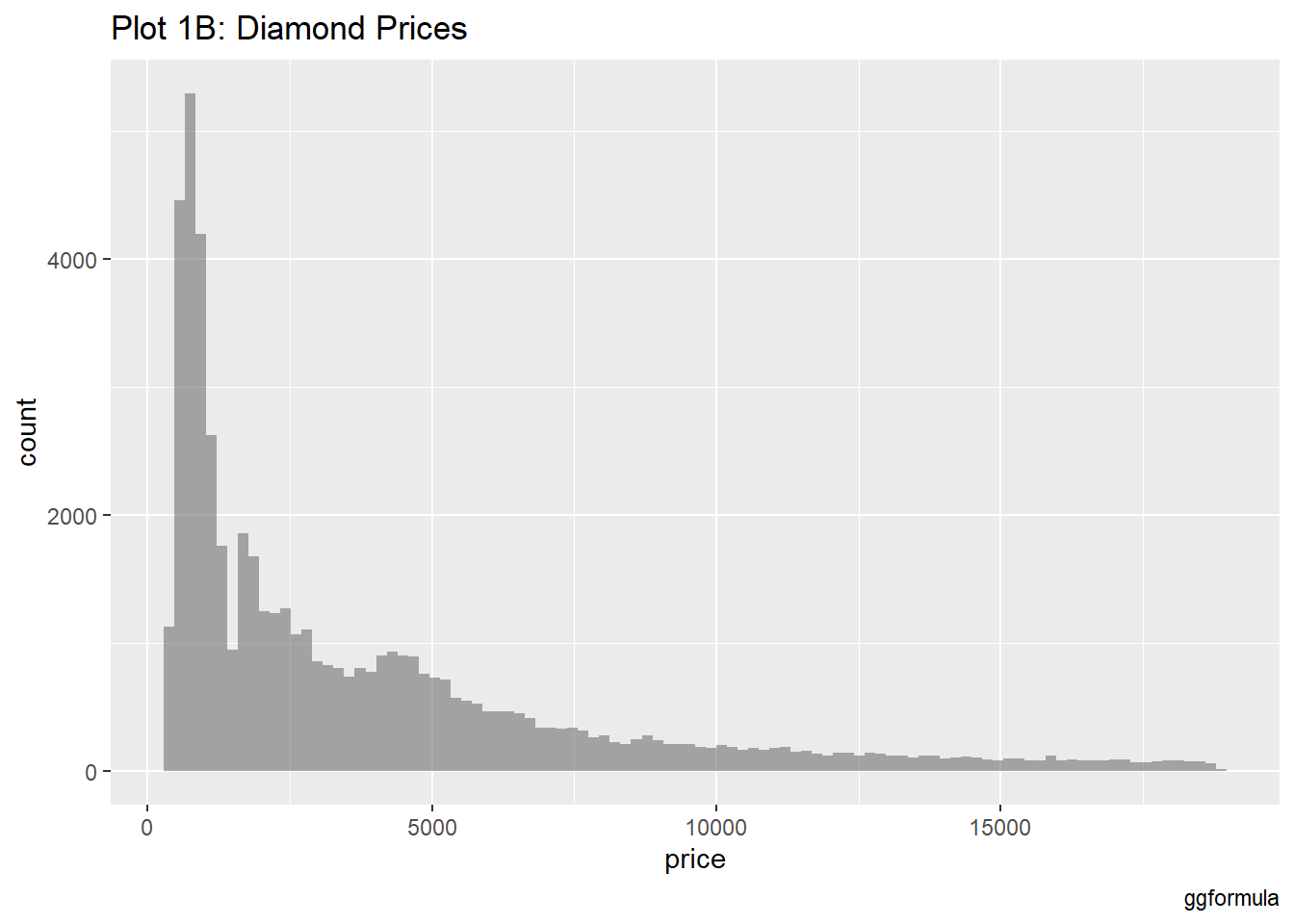
What is the distribution of the target variable price?

gf_histogram(~price, data = diamonds) %>%
  gf_labs(
    title = "Plot 1A: Diamond Prices",
    caption = "ggformula"
  )

Plot 1B: Diamond Prices

gf_histogram(~price,
  data = diamonds,
  bins = 100
) %>%
  gf_labs(
    title = "Plot 1B: Diamond Prices",
    caption = "ggformula"
  )

# bins- number of classes on the x-axis

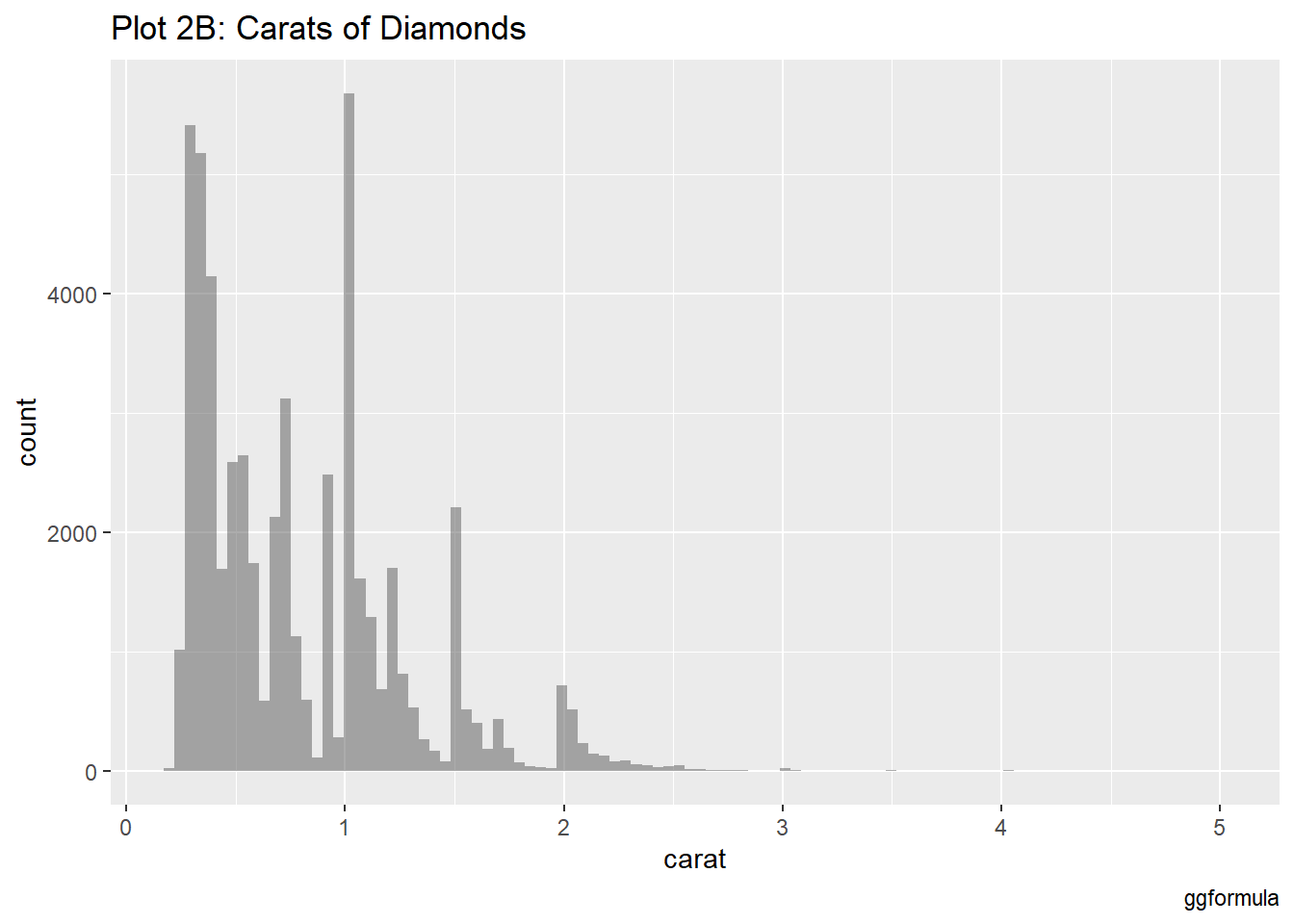
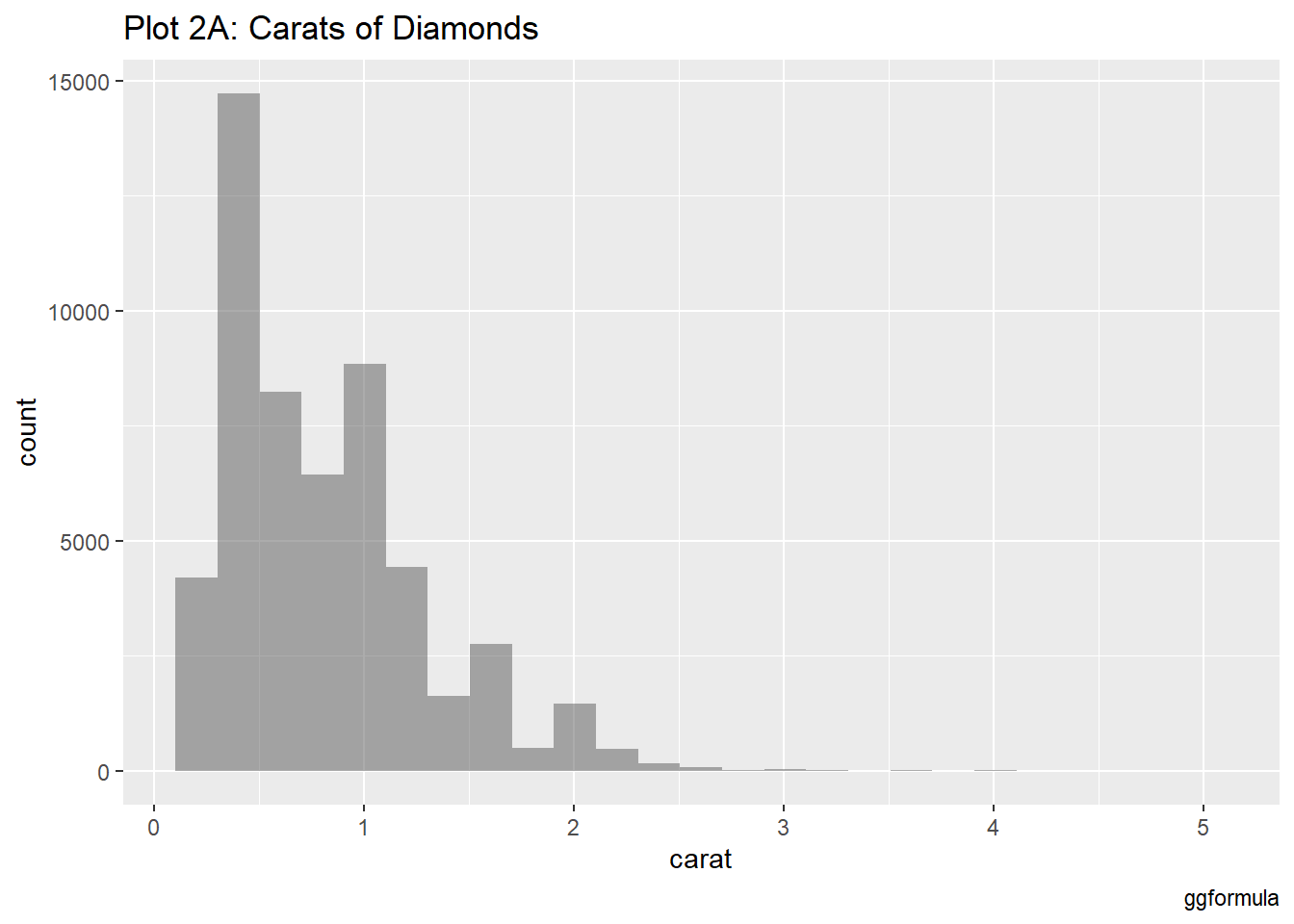
What is the distribution of the predictor variable carat?

diamonds %>%
  gf_histogram(~carat) %>%
  gf_labs(
    title = "Plot 2A: Carats of Diamonds",
    caption = "ggformula"
  )

Plot 2B: Carats of Diamonds

diamonds %>%
  gf_histogram(~carat,
    bins = 100
  ) %>%
  gf_labs(
    title = "Plot 2B: Carats of Diamonds",
    caption = "ggformula"
  )

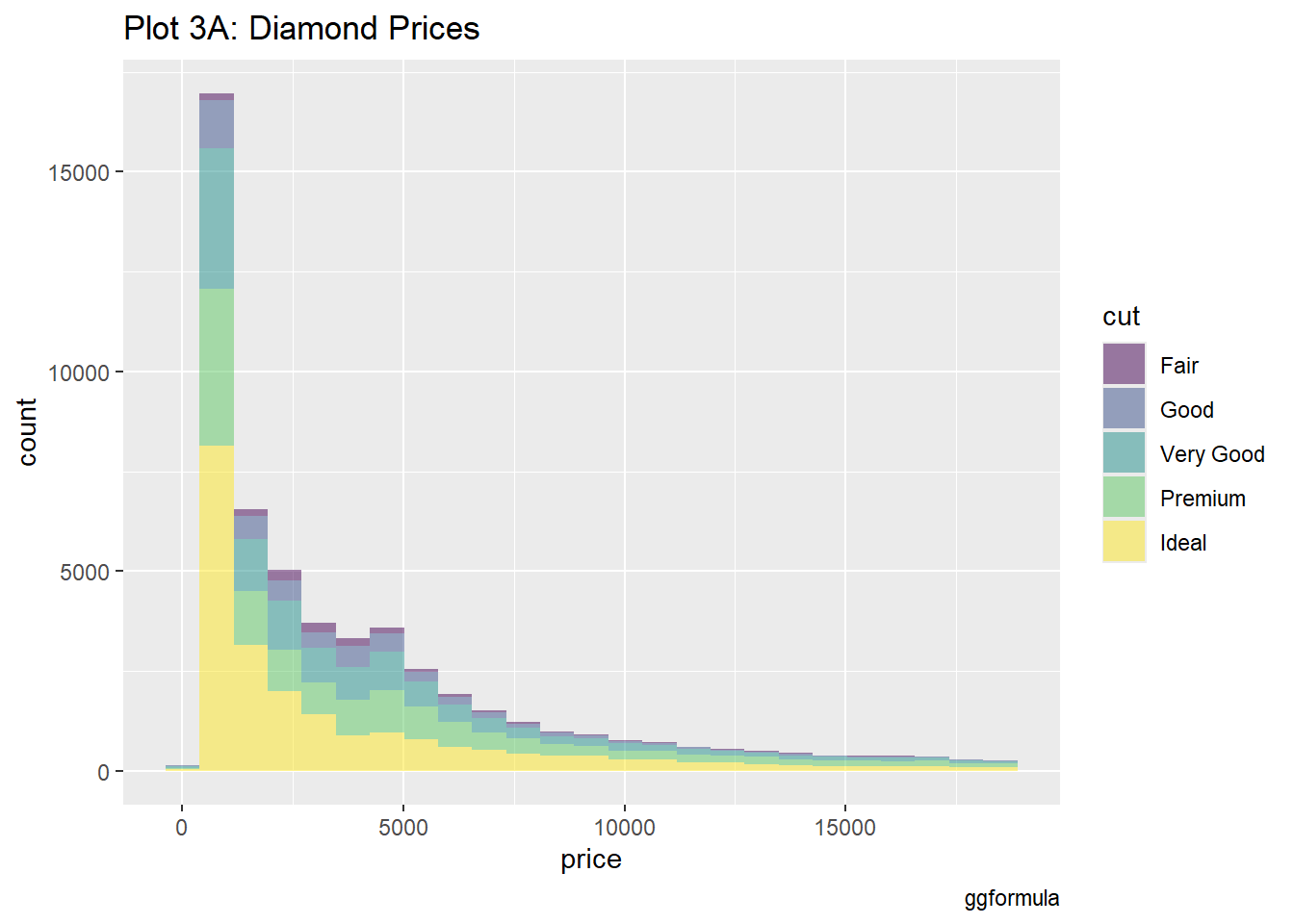
Does a price distribution vary based upon type of cut, clarity, and colour?

gf_histogram(~price, fill = ~cut, data = diamonds) %>%
  gf_labs(title = "Plot 3A: Diamond Prices", caption = "ggformula")

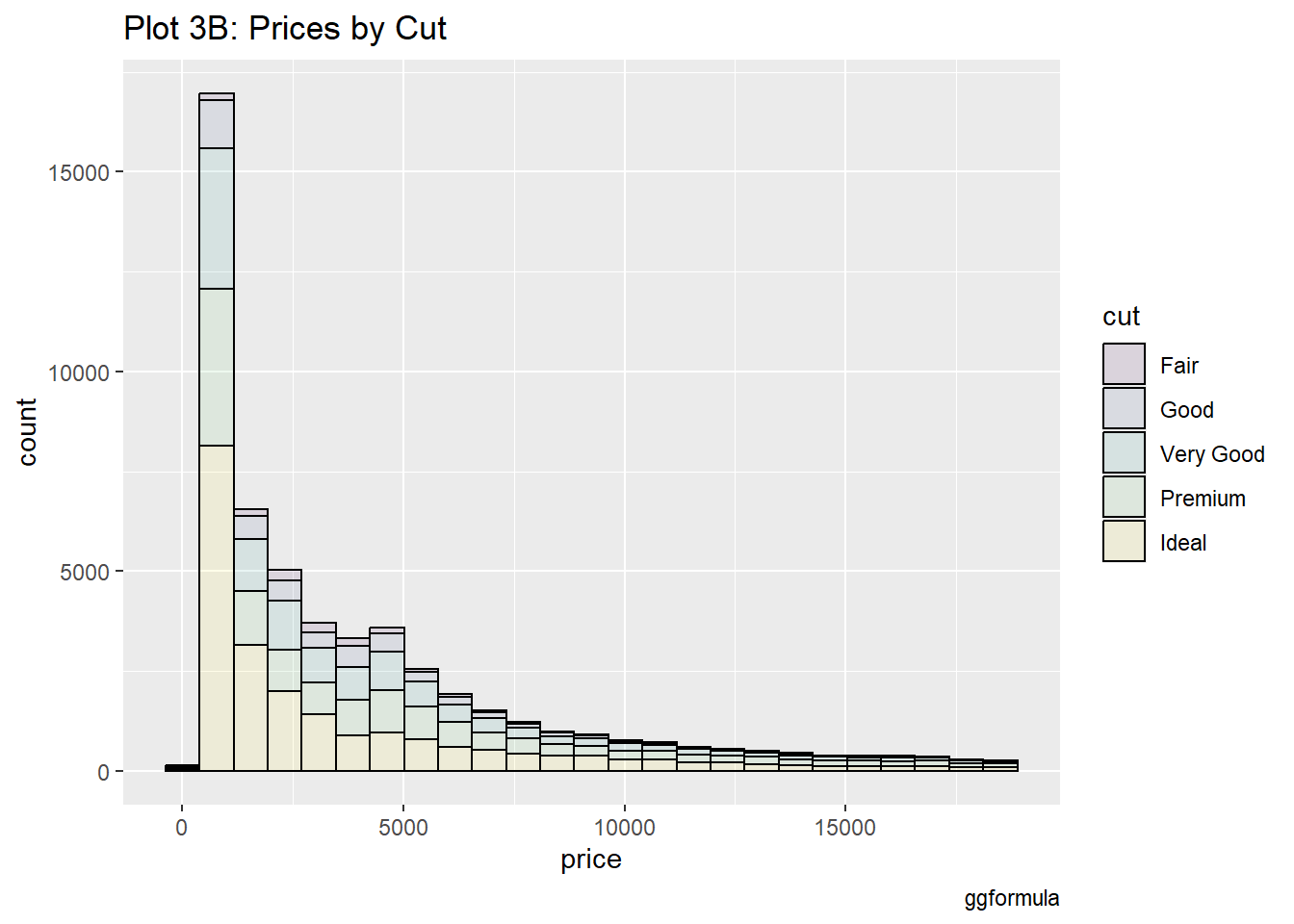
Plot 3B: Prices by Cut

diamonds %>%
  gf_histogram(~price, fill = ~cut, color = "black", alpha = 0.1) %>%
  gf_labs(
    title = "Plot 3B: Prices by Cut",
    caption = "ggformula"
  )

#color- colour of outline, alpha- opacity of filled colour

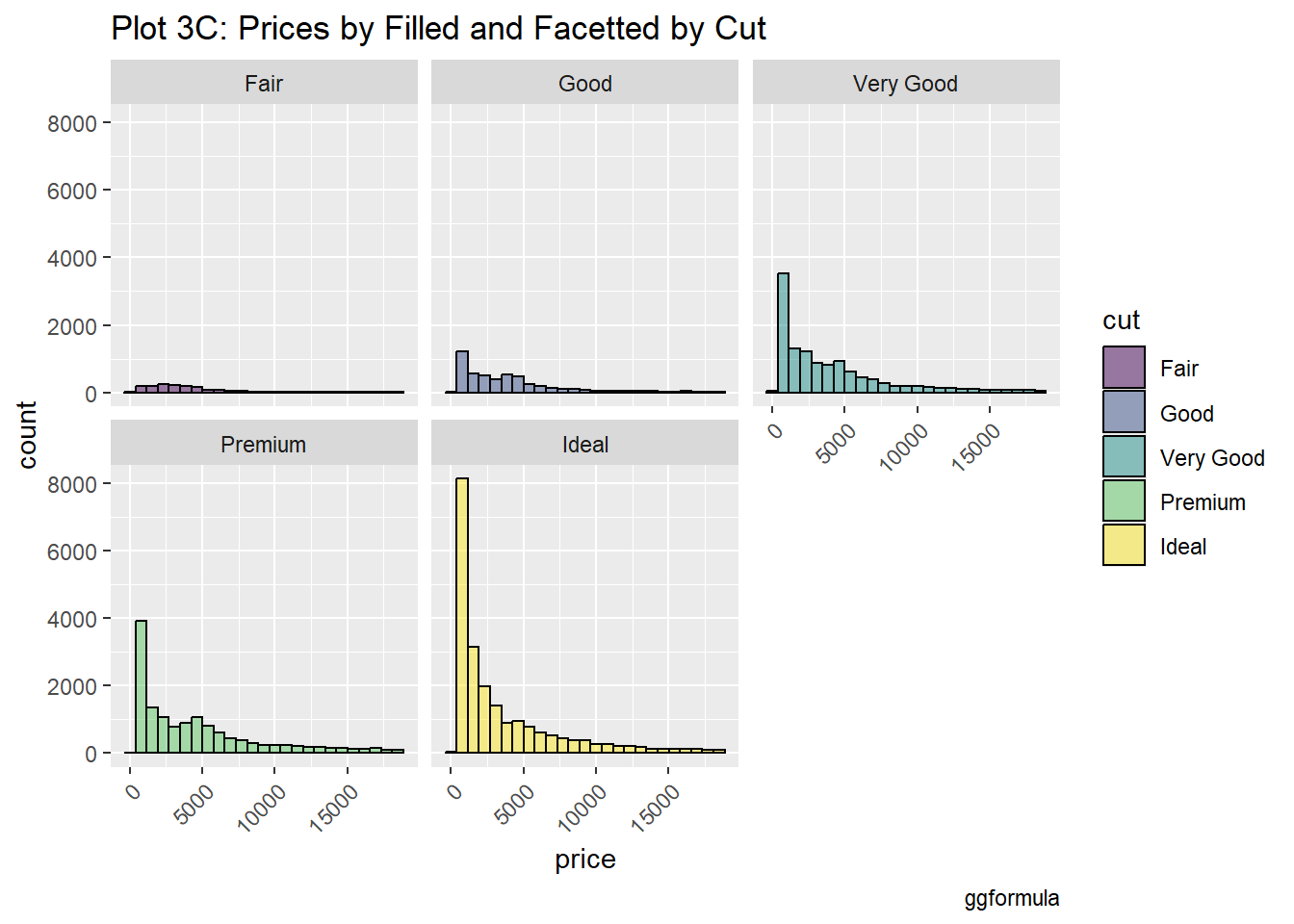
Plot 3C: Prices by Filled and Facetted by Cut

diamonds %>%
  gf_histogram(~price, fill = ~cut, color = "black", alpha = 0.5) %>%
  gf_facet_wrap(~cut) %>%
  gf_labs(
    title = "Plot 3C: Prices by Filled and Facetted by Cut",
    caption = "ggformula"
  ) %>%
  gf_theme(theme(
    axis.text.x = element_text(
      angle = 45,
      hjust = 1
    )
  ))

# gf_facet_wrap- divides the one graph into various graphs depending on the numbers of levels, gf_theme- style of text for characters titling the x-axis

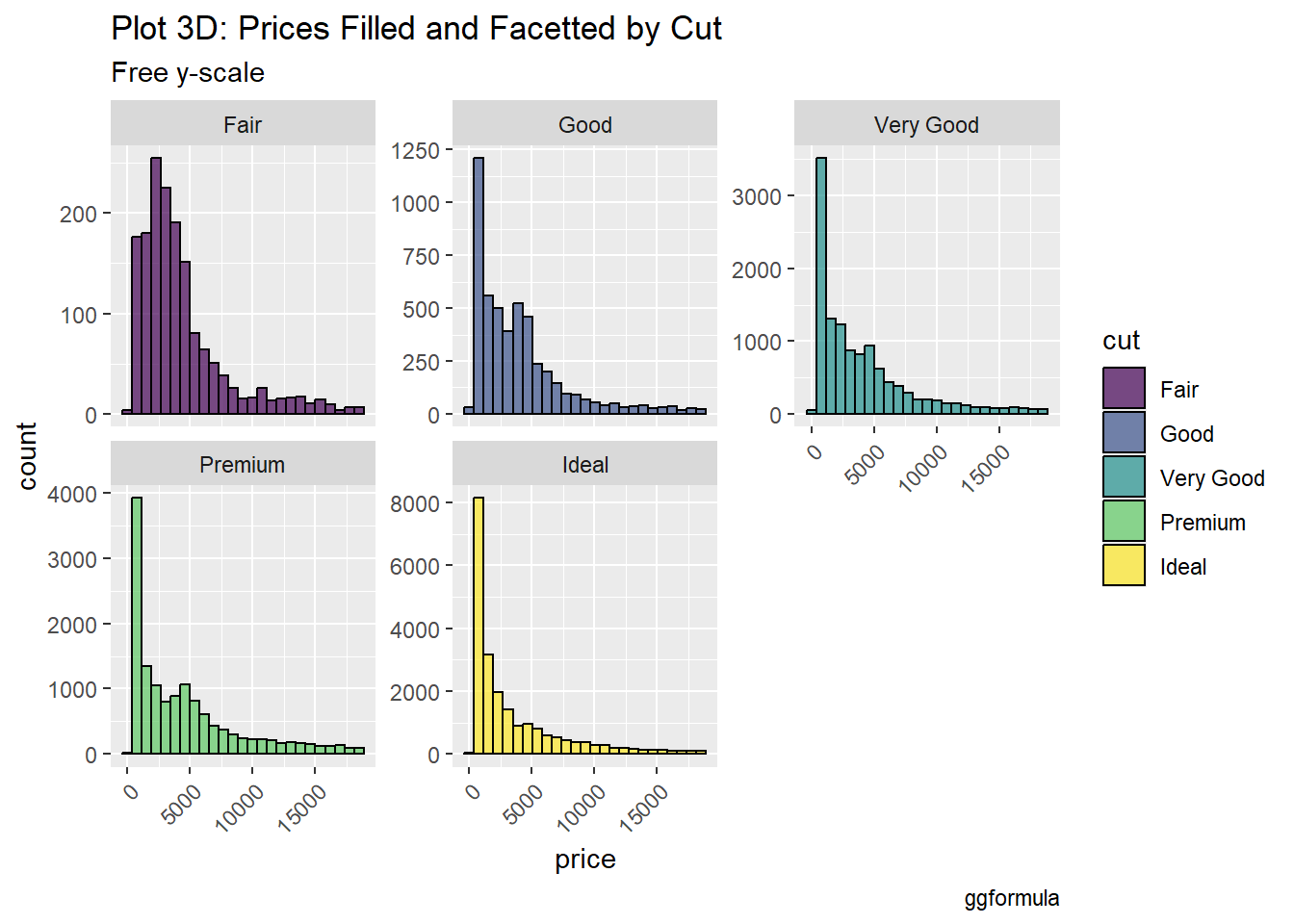
Plot 3D: Prices Filled and Facetted by Cut

diamonds %>%
  gf_histogram(~price, fill = ~cut, color = "black", alpha = 0.7) %>%
  gf_facet_wrap(~cut, scales = "free_y", nrow = 2) %>%
  gf_labs(
    title = "Plot 3D: Prices Filled and Facetted by Cut",
    subtitle = "Free y-scale",
    caption = "ggformula"
  ) %>%
  gf_theme(theme(
    axis.text.x =
      element_text(
        angle = 45,
        hjust = 1
      )
  ))

# free y-scale- each different graph will now follow a different scale along the y-axis according to requirements

Look at the two datasets- “race_df” and “rank_df”

race_df <- read_csv("https://raw.githubusercontent.com/rfordatascience/tidytuesday/master/data/2021/2021-10-26/race.csv")
Rows: 1207 Columns: 13
── Column specification ────────────────────────────────────────────────────────
Delimiter: ","
chr  (5): event, race, city, country, participation
dbl  (6): race_year_id, distance, elevation_gain, elevation_loss, aid_statio...
date (1): date
time (1): start_time

ℹ Use `spec()` to retrieve the full column specification for this data.
ℹ Specify the column types or set `show_col_types = FALSE` to quiet this message.
rank_df <- read_csv("https://raw.githubusercontent.com/rfordatascience/tidytuesday/master/data/2021/2021-10-26/ultra_rankings.csv")
Rows: 137803 Columns: 8
── Column specification ────────────────────────────────────────────────────────
Delimiter: ","
chr (4): runner, time, gender, nationality
dbl (4): race_year_id, rank, age, time_in_seconds

ℹ Use `spec()` to retrieve the full column specification for this data.
ℹ Specify the column types or set `show_col_types = FALSE` to quiet this message.

Dataset - race_df

race_df
# A tibble: 1,207 × 13
   race_year_id event    race  city  country date       start_time participation
          <dbl> <chr>    <chr> <chr> <chr>   <date>     <time>     <chr>        
 1        68140 Peak Di… Mill… Cast… United… 2021-09-03 19:00      solo         
 2        72496 UTMB®    UTMB® Cham… France  2021-08-27 17:00      Solo         
 3        69855 Grand R… Ultr… viel… France  2021-08-20 05:00      solo         
 4        67856 Persenk… PERS… Asen… Bulgar… 2021-08-20 18:00      solo         
 5        70469 Runfire… 100 … uluk… Turkey  2021-08-20 18:00      solo         
 6        66887 Swiss A… 160KM Müns… Switze… 2021-08-15 17:00      solo         
 7        67851 Salomon… Salo… Foll… Norway  2021-08-14 07:00      solo         
 8        68241 Ultra T… 160KM Spa   Belgium 2021-08-14 07:00      solo         
 9        70241 Québec … QMT-… Beau… Canada  2021-08-13 22:00      solo         
10        69945 Bunketo… BBUT… LIND… Sweden  2021-08-07 10:00      solo         
# ℹ 1,197 more rows
# ℹ 5 more variables: distance <dbl>, elevation_gain <dbl>,
#   elevation_loss <dbl>, aid_stations <dbl>, participants <dbl>

Dataset - rank_df

rank_df
# A tibble: 137,803 × 8
   race_year_id  rank runner      time    age gender nationality time_in_seconds
          <dbl> <dbl> <chr>       <chr> <dbl> <chr>  <chr>                 <dbl>
 1        68140     1 VERHEUL Ja… 26H …    30 M      GBR                   95725
 2        68140     2 MOULDING J… 27H …    43 M      GBR                   97229
 3        68140     3 RICHARDSON… 28H …    38 M      GBR                  103747
 4        68140     4 DYSON Fiona 30H …    55 W      GBR                  111217
 5        68140     5 FRONTERAS … 32H …    48 W      GBR                  117981
 6        68140     6 THOMAS Lei… 32H …    31 M      GBR                  118000
 7        68140     7 SHORT Debo… 33H …    55 W      GBR                  120601
 8        68140     8 CROSSLEY C… 33H …    40 W      GBR                  120803
 9        68140     9 BUTCHER Ke… 34H …    47 M      GBR                  125656
10        68140    10 Hendry Bill 34H …    29 M      GBR                  125979
# ℹ 137,793 more rows

Glimpse - race_df

glimpse(race_df)
Rows: 1,207
Columns: 13
$ race_year_id   <dbl> 68140, 72496, 69855, 67856, 70469, 66887, 67851, 68241,…
$ event          <chr> "Peak District Ultras", "UTMB®", "Grand Raid des Pyréné…
$ race           <chr> "Millstone 100", "UTMB®", "Ultra Tour 160", "PERSENK UL…
$ city           <chr> "Castleton", "Chamonix", "vielle-Aure", "Asenovgrad", "…
$ country        <chr> "United Kingdom", "France", "France", "Bulgaria", "Turk…
$ date           <date> 2021-09-03, 2021-08-27, 2021-08-20, 2021-08-20, 2021-0…
$ start_time     <time> 19:00:00, 17:00:00, 05:00:00, 18:00:00, 18:00:00, 17:0…
$ participation  <chr> "solo", "Solo", "solo", "solo", "solo", "solo", "solo",…
$ distance       <dbl> 166.9, 170.7, 167.0, 164.0, 159.9, 159.9, 163.8, 163.9,…
$ elevation_gain <dbl> 4520, 9930, 9980, 7490, 100, 9850, 5460, 4630, 6410, 31…
$ elevation_loss <dbl> -4520, -9930, -9980, -7500, -100, -9850, -5460, -4660, …
$ aid_stations   <dbl> 10, 11, 13, 13, 12, 15, 5, 8, 13, 23, 13, 5, 12, 15, 0,…
$ participants   <dbl> 150, 2300, 600, 150, 0, 300, 0, 200, 120, 100, 300, 50,…

Glimpse - rank_df

glimpse(rank_df)
Rows: 137,803
Columns: 8
$ race_year_id    <dbl> 68140, 68140, 68140, 68140, 68140, 68140, 68140, 68140…
$ rank            <dbl> 1, 2, 3, 4, 5, 6, 7, 8, 9, 10, 11, 12, 13, NA, NA, NA,…
$ runner          <chr> "VERHEUL Jasper", "MOULDING JON", "RICHARDSON Phill", …
$ time            <chr> "26H 35M 25S", "27H 0M 29S", "28H 49M 7S", "30H 53M 37…
$ age             <dbl> 30, 43, 38, 55, 48, 31, 55, 40, 47, 29, 48, 47, 52, 49…
$ gender          <chr> "M", "M", "M", "W", "W", "M", "W", "W", "M", "M", "M",…
$ nationality     <chr> "GBR", "GBR", "GBR", "GBR", "GBR", "GBR", "GBR", "GBR"…
$ time_in_seconds <dbl> 95725, 97229, 103747, 111217, 117981, 118000, 120601, …

Summary of Statistics - Distance

race_df %>%
  favstats(~distance, data = .)
 min    Q1 median     Q3   max     mean       sd    n missing
   0 160.1  161.5 165.15 179.1 152.6187 39.87864 1207       0
# favstats- summary statistics (such as the minimum, maximum, mean, median, standard deviation, and more) 

Summary of Statistics - Time in seconds, Gender

rank_df %>%
  drop_na() %>%
  favstats(time_in_seconds ~ gender, data = .)
  gender  min      Q1 median       Q3    max     mean       sd      n missing
1      M 3600 96536.5 115845 149761.5 288000 123271.1 37615.42 101643       0
2      W 9191 96695.0 107062 131464.0 296806 117296.5 34604.26  18341       0
# drop_na()- removes rows that contain missing values

Crosstable

crosstable(time_in_seconds + age ~ gender, data = rank_df) %>%
  crosstable::as_flextable()

label

variable

gender

M

W

NA

time_in_seconds

Min / Max

3600.0 / 2.9e+05

9191.0 / 3.0e+05

8131.0 / 2.2e+05

Med [IQR]

1.2e+05 [9.7e+04;1.5e+05]

1.1e+05 [9.7e+04;1.3e+05]

1.2e+05 [9.9e+04;1.5e+05]

Mean (std)

1.2e+05 (3.8e+04)

1.2e+05 (3.5e+04)

1.2e+05 (4.4e+04)

N (NA)

101643 (15073)

18341 (2716)

28 (2)

age

Min / Max

0 / 133.0

0 / 81.0

29.0 / 59.0

Med [IQR]

47.0 [40.0;53.0]

45.0 [39.0;52.0]

40.5 [36.0;50.5]

Mean (std)

46.4 (10.2)

45.3 (9.7)

41.7 (9.0)

N (NA)

116716 (0)

21057 (0)

30 (0)

# crosstable- useful for exploring the relationship between two or more categorical variables, and it often includes descriptive statistics for numeric variables.

Arranging countries in descending order of counts under races

race_df %>%
  count(country) %>%
  arrange(desc(n))
# A tibble: 61 × 2
   country            n
   <chr>          <int>
 1 United States    438
 2 United Kingdom   110
 3 France            56
 4 Australia         46
 5 Sweden            46
 6 China             45
 7 Canada            32
 8 Spain             27
 9 Japan             24
10 Poland            23
# ℹ 51 more rows
# count(country): This function counts the occurrences of each unique value in the country column.
# arrange(desc(n)): This function sorts the resulting data frame in descending order (desc) based on the count (n).

Arranging in descending order of counts under nationality

rank_df %>%
  count(nationality) %>%
  arrange(desc(n))
# A tibble: 133 × 2
   nationality     n
   <chr>       <int>
 1 USA         47259
 2 FRA         28905
 3 GBR         11076
 4 JPN          6729
 5 ESP          5478
 6 CHN          4744
 7 CAN          2822
 8 ITA          2794
 9 SWE          2293
10 AUS          1683
# ℹ 123 more rows

Filtering according to ranks

rank_df %>%
  filter(rank %in% c(1, 2, 3)) %>%
  count(nationality) %>%
  arrange(desc(n))
# A tibble: 69 × 2
   nationality     n
   <chr>       <int>
 1 USA          1240
 2 GBR           347
 3 FRA           210
 4 AUS           140
 5 CAN           132
 6 CHN           128
 7 SWE           124
 8 ESP           113
 9 JPN            94
10 ITA            79
# ℹ 59 more rows
# filter(rank %in% c(1, 2, 3))- This function filters the rows of rank_df where the rank column contains the values 1, 2, or 3.

Number of participants from different nationalities appearing in the top 10 ranks of the longest races, sorted by the highest count of participants per nationality

longest_races <- race_df %>%
  slice_max(n = 5, order_by = distance) # Longest distance races
longest_races
# A tibble: 6 × 13
  race_year_id event     race  city  country date       start_time participation
         <dbl> <chr>     <chr> <chr> <chr>   <date>     <time>     <chr>        
1        68776 Ultra To… Ut4M… Gren… France  2021-07-16 18:00      Solo         
2        55551 Ultra Tr… Inth… Chom… Thaila… 2020-02-14 10:00      solo         
3         7484 Le TREG®… LE T… Fada  Chad    2015-02-06 00:00      solo         
4         7594 THE GREA… 100 … Pato… Austra… 2014-09-13 00:00      Solo         
5        71066 ULTRA 01  Ultr… Oyon… France  2021-07-09 18:00      solo         
6        23565 EstrelAç… Estr… Penh… Portug… 2017-10-06 18:00      Solo         
# ℹ 5 more variables: distance <dbl>, elevation_gain <dbl>,
#   elevation_loss <dbl>, aid_stations <dbl>, participants <dbl>
longest_races %>%
  left_join(., rank_df, by = "race_year_id") %>% # total participants in longest 4 races
  filter(rank %in% c(1:10)) %>% # Top 10 ranks
  count(nationality) %>%
  arrange(desc(n))
# A tibble: 9 × 2
  nationality     n
  <chr>       <int>
1 FRA            26
2 AUS             9
3 POR             8
4 THA             8
5 BEL             1
6 BRA             1
7 ESP             1
8 MAS             1
9 RUS             1
# slice_max(n = 5, order_by = distance)- This function selects the top 5 rows (races) from race_df, ordering them by the distance column in descending order, meaning it returns the races with the longest distances.
# left_join(., rank_df, by = "race_year_id")- This joins the longest_races data frame with the rank_df data frame on the race_year_id column. The . represents the data passed from the previous pipe.
# filter(rank %in% c(1:10))- After joining, this filters the data to include only participants who ranked between 1 and 10. It keeps the top 10 participants for each of the longest races.

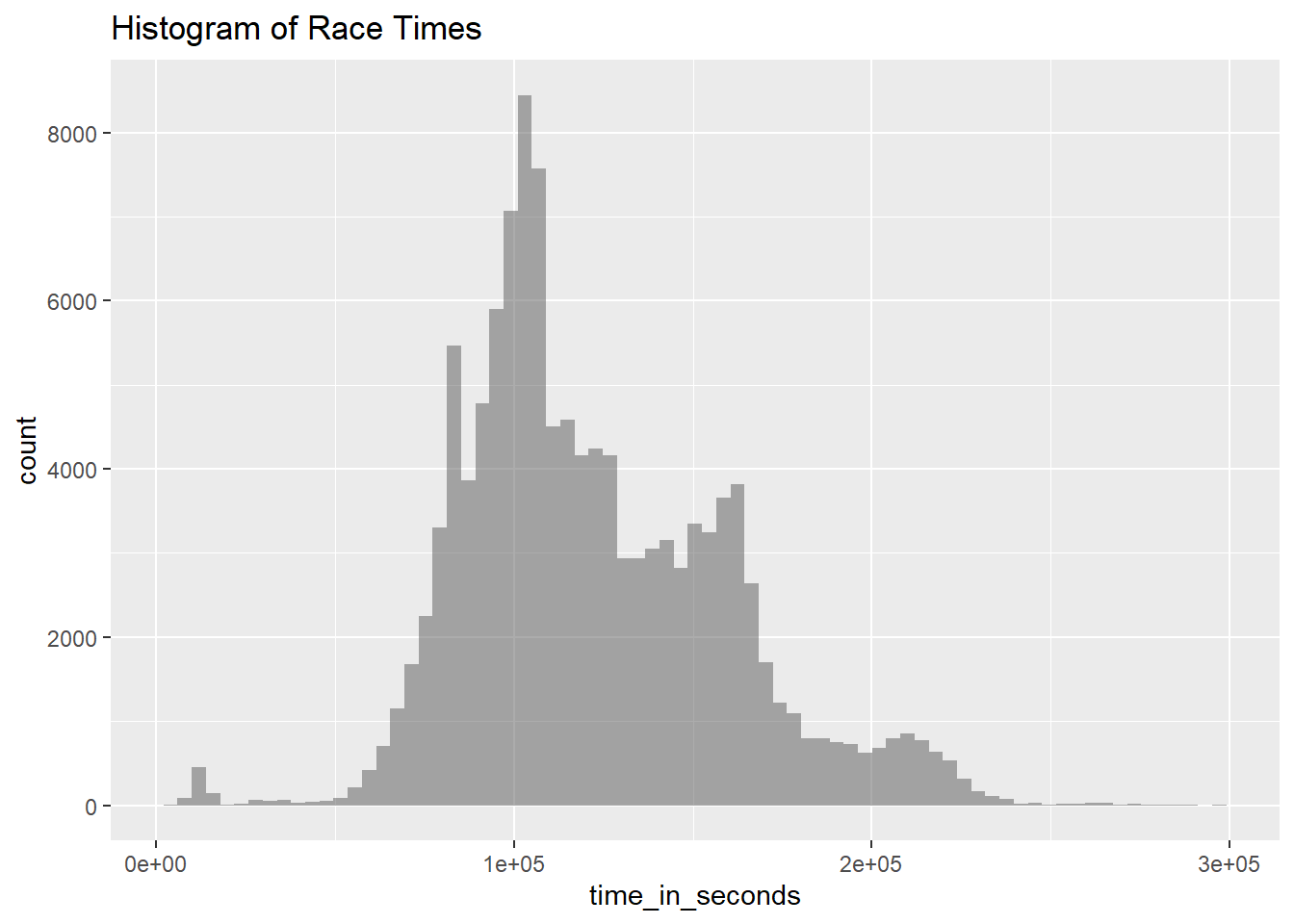
Histogram of Race Times

rank_df %>%
  gf_histogram(~time_in_seconds, bins = 75) %>%
  gf_labs(title = "Histogram of Race Times")
Warning: Removed 17791 rows containing non-finite outside the scale range
(`stat_bin()`).

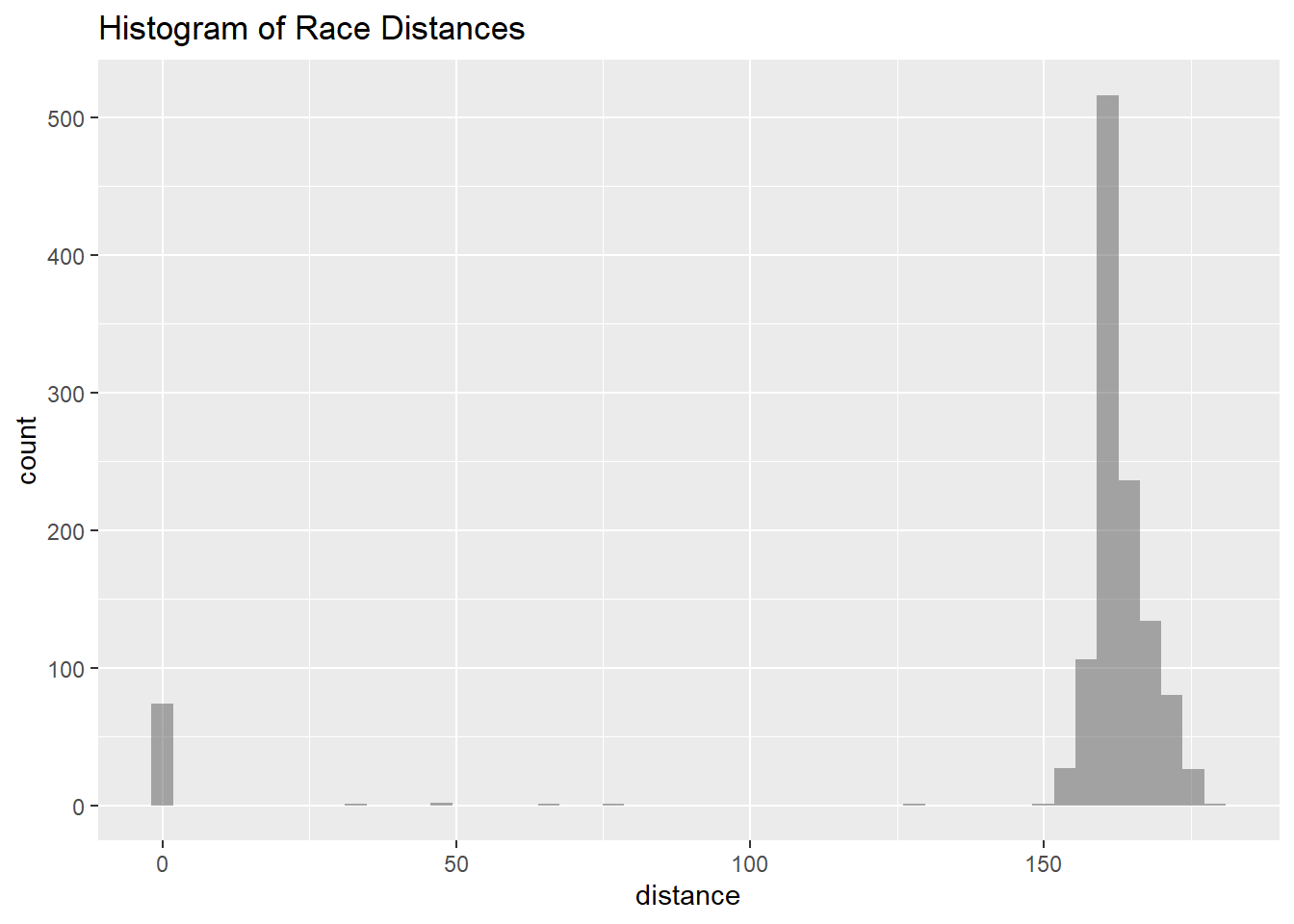
Histogram of Race Distances

race_df %>%
  gf_histogram(~distance, bins = 50) %>%
  gf_labs(title = "Histogram of Race Distances")

Filtering raceswith Distance=0

race_df %>%
  filter(distance == 0)
# A tibble: 74 × 13
   race_year_id event    race  city  country date       start_time participation
          <dbl> <chr>    <chr> <chr> <chr>   <date>     <time>     <chr>        
 1        64771 The Old… 100m… Hanm… New Ze… 2021-05-14 10:00      solo         
 2        71220 Run Lov… 100M  <NA>  United… 2021-02-26 00:00      solo         
 3        67160 IDAHO M… 100 … <NA>  United… 2020-09-12 00:00      solo         
 4        67713 Pine cr… 100M… Well… PA, Un… 2020-09-12 00:00      solo         
 5        51777 Chiemga… 100 … Berg… Germany 2020-07-31 13:00      Solo         
 6        66413 Palisad… Moos… Irwin United… 2020-07-17 05:00      solo         
 7        62593 Run Lov… 100M  <NA>  United… 2020-02-28 00:00      solo         
 8        50097 The Gre… The … Hanm… New Ze… 2020-01-17 07:00      solo         
 9        65861 Loup Ga… 100M  Vill… LA, Un… 2019-12-14 00:00      solo         
10        59415 RIO DEL… 100 … <NA>  United… 2019-11-07 00:00      solo         
# ℹ 64 more rows
# ℹ 5 more variables: distance <dbl>, elevation_gain <dbl>,
#   elevation_loss <dbl>, aid_stations <dbl>, participants <dbl>
# Could be cancelled events

Arranging in descending order of counts under Race Start Time

race_times <- race_df %>%
  count(start_time) %>%
  arrange(desc(n))
race_times
# A tibble: 39 × 2
   start_time     n
   <time>     <int>
 1 00:00        513
 2 06:00        114
 3 08:00         63
 4 10:00         60
 5 07:00         58
 6 18:00         50
 7 05:00         48
 8 12:00         38
 9 04:00         30
10 09:00         27
# ℹ 29 more rows

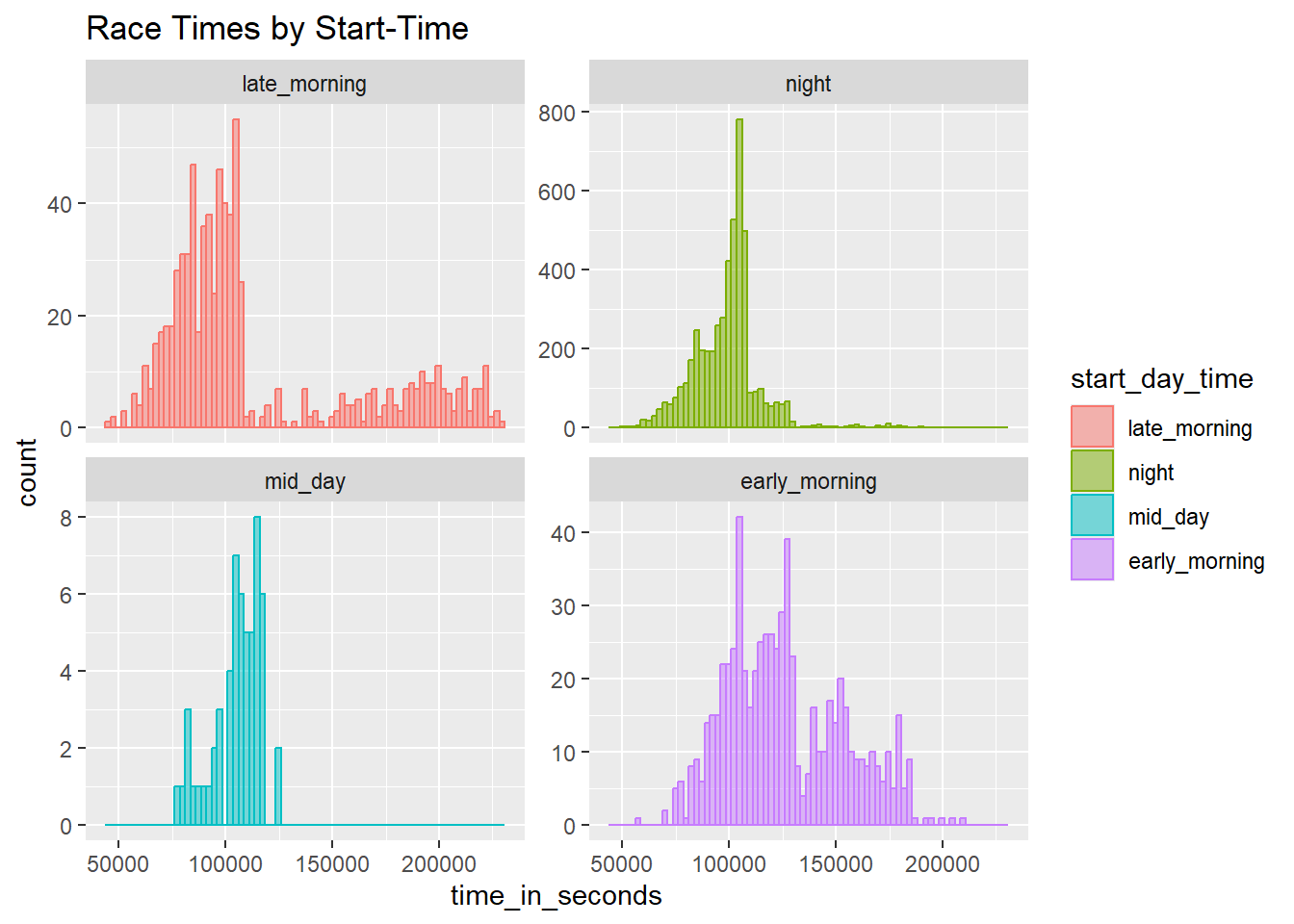
Distribution of race times based on when the race started during the day

race_start_factor <- race_df %>%
  filter(distance == 0) %>% # Races that actually took place
  mutate(
    start_day_time =
      case_when(
        start_time > hms("02:00:00") &
          start_time <= hms("06:00:00") ~ "early_morning",
        start_time > hms("06:00:01") &
          start_time <= hms("10:00:00") ~ "late_morning",
        start_time > hms("10:00:01") &
          start_time <= hms("14:00:00") ~ "mid_day",
        start_time > hms("14:00:01") &
          start_time <= hms("18:00:00") ~ "afternoon",
        start_time > hms("18:00:01") &
          start_time <= hms("22:00:00") ~ "evening",
        start_time > hms("22:00:01") &
          start_time <= hms("23:59:59") ~ "night",
        start_time >= hms("00:00:00") &
          start_time <= hms("02:00:00") ~ "postmidnight",
        .default = "other"
      )
  ) %>%
  mutate(
    start_day_time =
      as_factor(start_day_time) %>%
        fct_collapse(
          .f = .,
          night = c("night", "postmidnight")
        )
  )
Warning: There was 1 warning in `mutate()`.
ℹ In argument: `start_day_time = `%>%`(...)`.
Caused by warning:
! Unknown levels in `f`: night
##
# Join with rank_df
race_start_factor %>%
  left_join(rank_df, by = "race_year_id") %>%
  drop_na(time_in_seconds) %>%
  gf_histogram(
    ~time_in_seconds,
    bins = 75,
    fill = ~start_day_time,
    color = ~start_day_time,
    alpha = 0.5
  ) %>%
  gf_facet_wrap(vars(start_day_time), ncol = 2, scales = "free_y") %>%
  gf_labs(title = "Race Times by Start-Time")

# filter(distance == 0): This filters the dataset to keep only the races that actually took place
# mutate(start_day_time = case_when(...)): The case_when() function categorizes the start_time into various parts of the day (e.g., "early_morning", "mid_day", etc.).
# hms(): A function that converts a time string to a time object
# fct_collapse(): After creating the start_day_time categories, it combines the "night" and "postmidnight" categories into a single "night" factor.
# left_join(rank_df, by = "race_year_id"): This joins the race_start_factor data frame with the rank_df data frame on the race_year_id column, bringing in additional details about rankings and times.
# drop_na(time_in_seconds): Removes any rows where the time_in_seconds column contains missing values, ensuring valid race time data for the visualization.
#  It uses 2 columns (ncol = 2).

Populations dataset

populations <- read_csv("../../data/populations.csv")
Rows: 16400 Columns: 4
── Column specification ────────────────────────────────────────────────────────
Delimiter: ","
chr (2): country_code, country_name
dbl (2): year, value

ℹ Use `spec()` to retrieve the full column specification for this data.
ℹ Specify the column types or set `show_col_types = FALSE` to quiet this message.
populations
# A tibble: 16,400 × 4
   country_code country_name  year value
   <chr>        <chr>        <dbl> <dbl>
 1 ABW          Aruba         1960 54608
 2 ABW          Aruba         1961 55811
 3 ABW          Aruba         1962 56682
 4 ABW          Aruba         1963 57475
 5 ABW          Aruba         1964 58178
 6 ABW          Aruba         1965 58782
 7 ABW          Aruba         1966 59291
 8 ABW          Aruba         1967 59522
 9 ABW          Aruba         1968 59471
10 ABW          Aruba         1969 59330
# ℹ 16,390 more rows

Inspect - populations dataset

inspect(populations)

categorical variables:  
          name     class levels     n missing
1 country_code character    265 16400       0
2 country_name character    265 16400       0
                                   distribution
1 ABW (0.4%), AFE (0.4%), AFG (0.4%) ...       
2 Afghanistan (0.4%) ...                       

quantitative variables:  
   name   class  min       Q1  median       Q3        max         mean
1  year numeric 1960   1975.0    1991     2006       2021 1.990529e+03
2 value numeric 2646 986302.5 6731400 46024452 7888408686 2.140804e+08
            sd     n missing
1 1.789551e+01 16400       0
2 7.040554e+08 16400       0

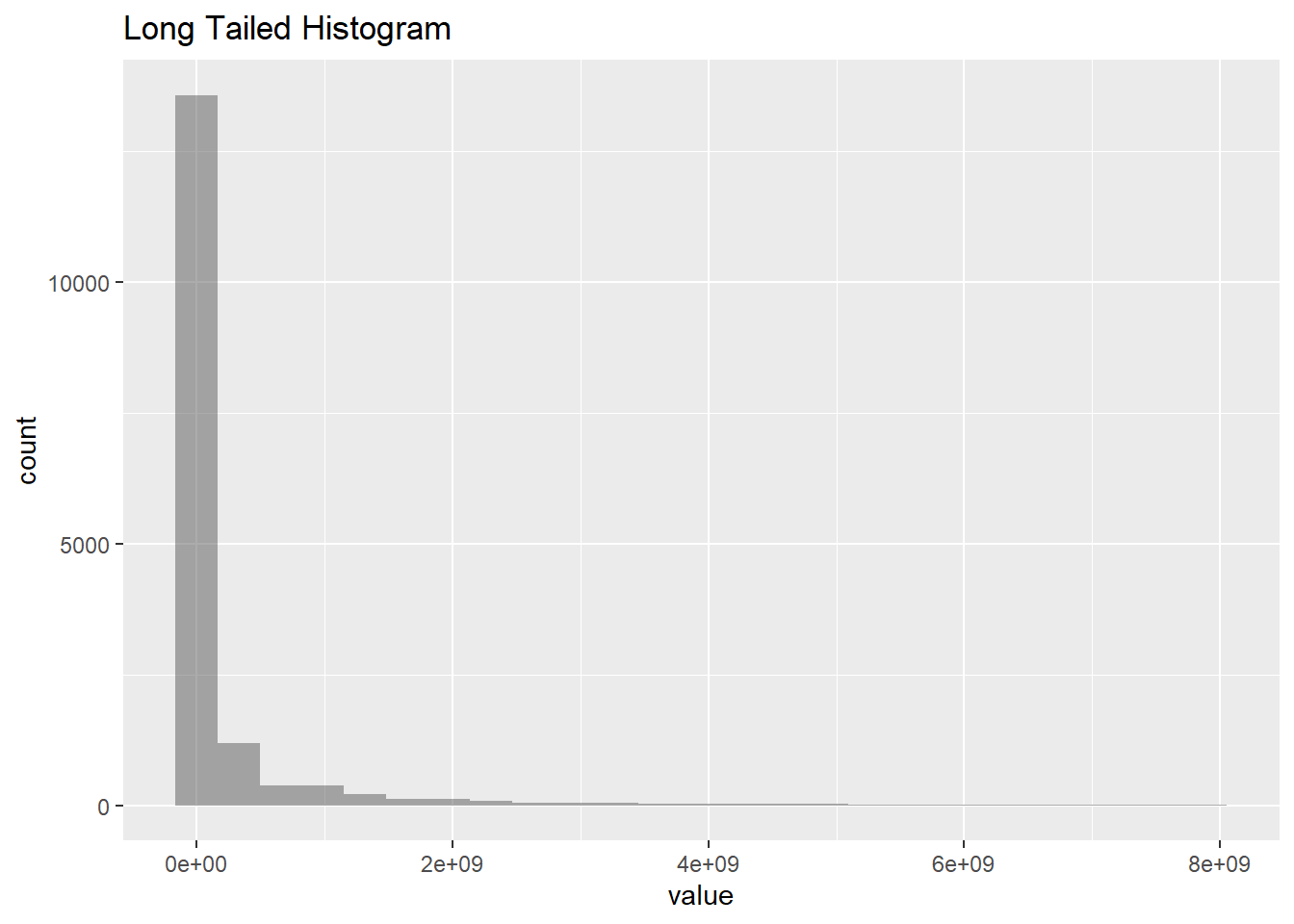
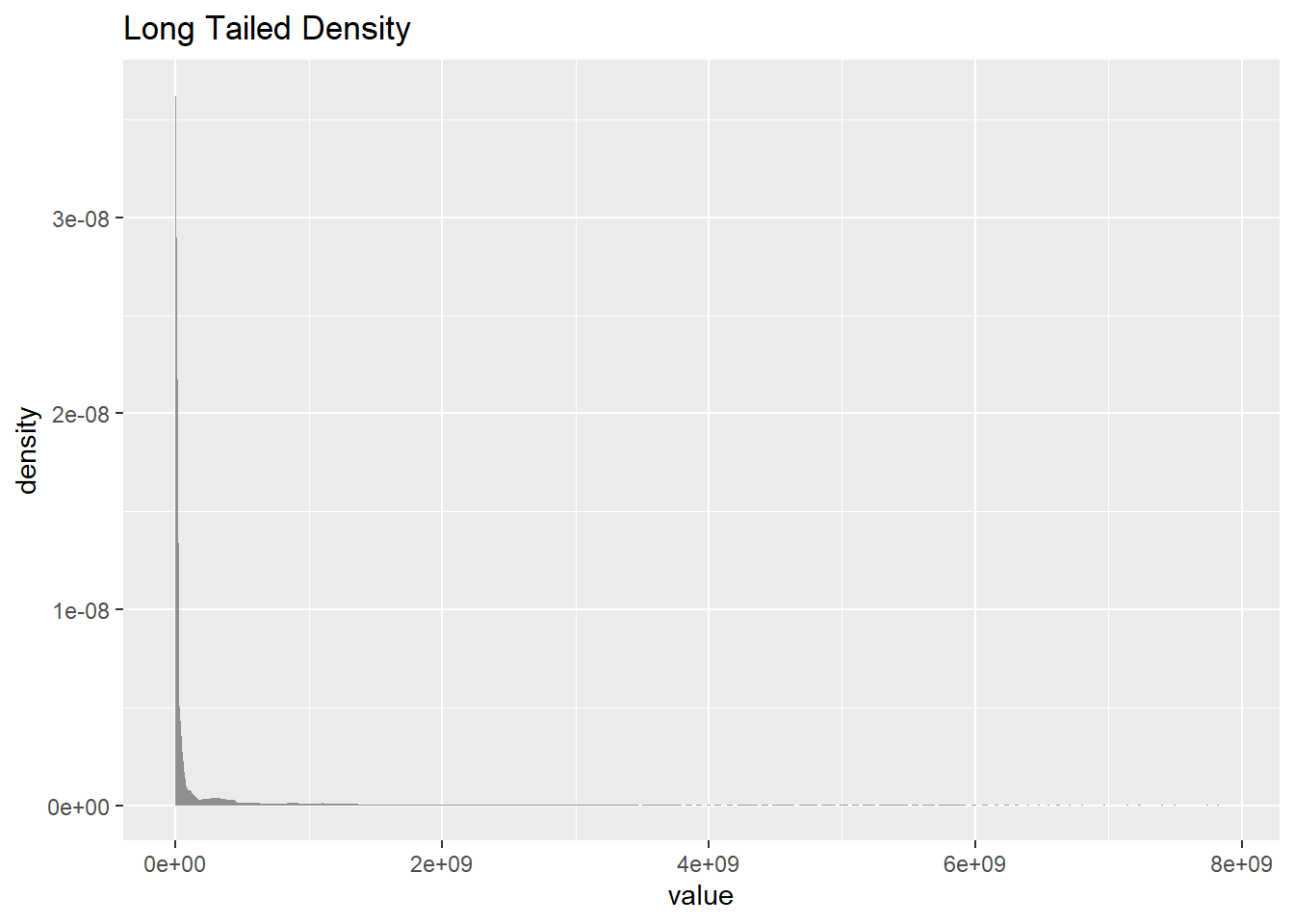
Long Tailed Histogram and Density

gf_histogram(~value, data = populations, title = "Long Tailed Histogram")

##
gf_density(~value, data = populations, title = "Long Tailed Density")

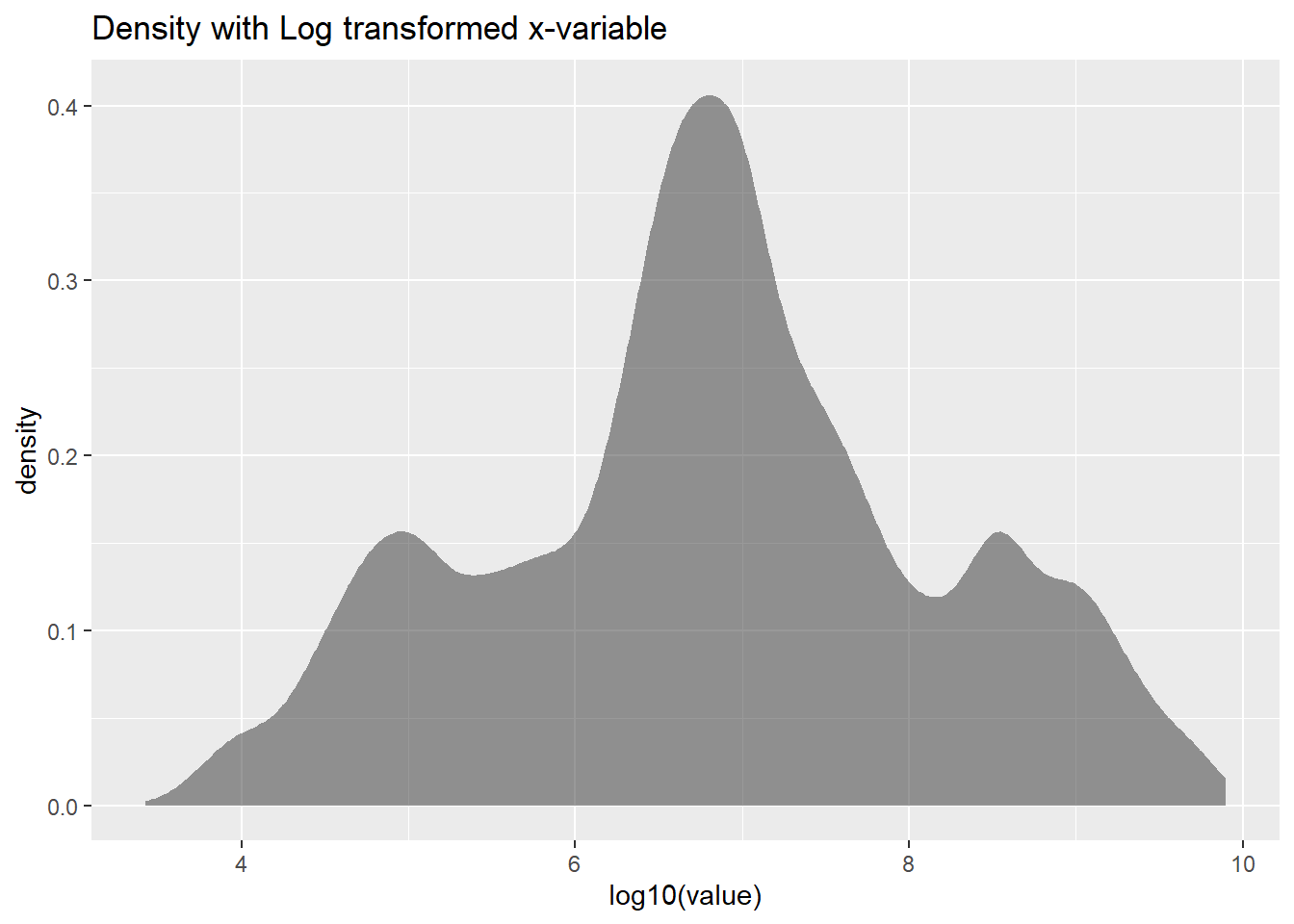
# gf_density(): This function creates a density plot, which is a smoothed version of the histogram. It estimates the probability density function of the variable. Shows the overall shape of the distribution without the bins.Shows both the discrete and continuous aspects of the distribution.

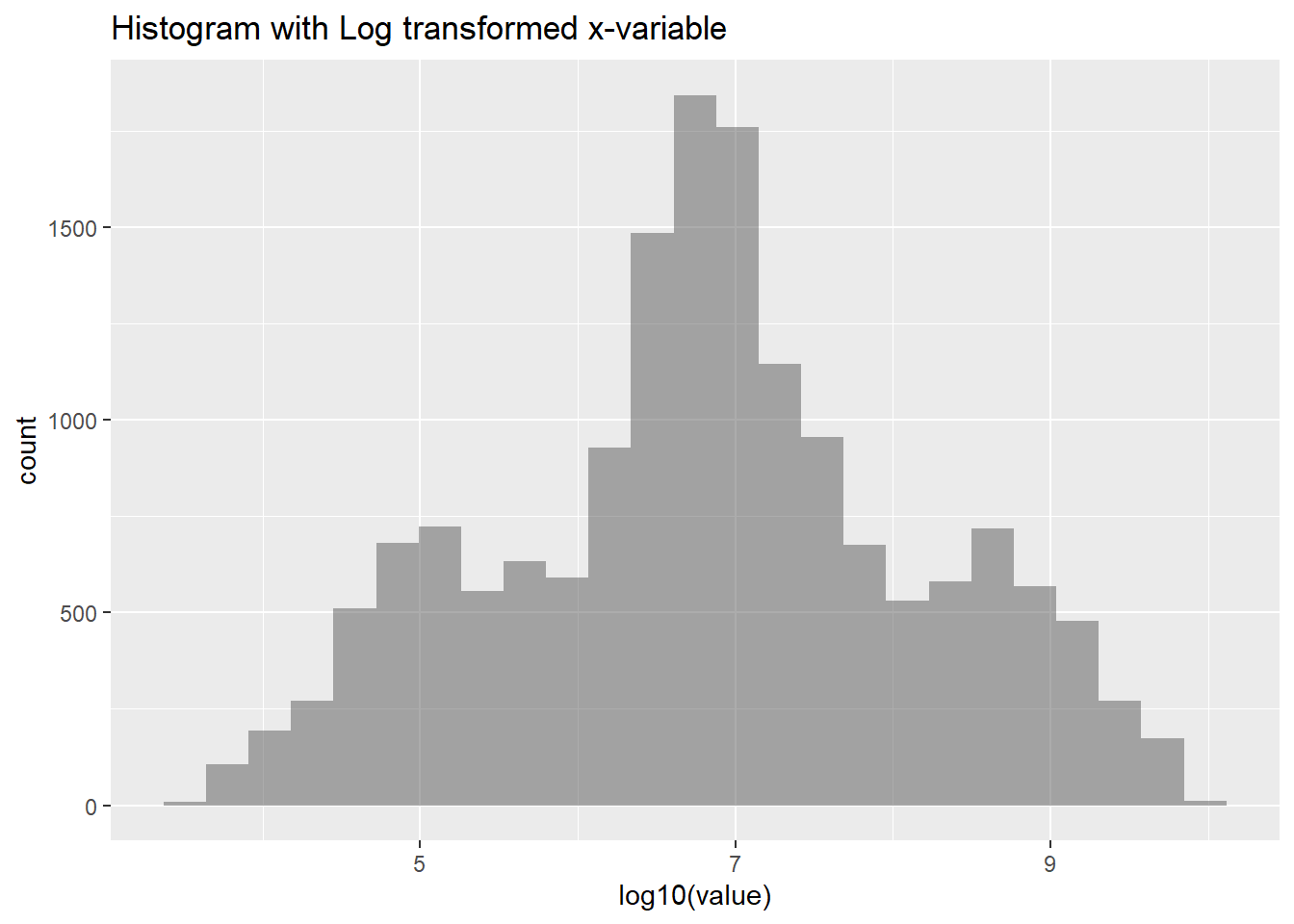
Histogram and Density with Log transformed x-variable

gf_histogram(~ log10(value), data = populations, title = "Histogram with Log transformed x-variable")

##
gf_density(~ log10(value), data = populations, title = "Density with Log transformed x-variable")